

 |
| Know your mobile manufacturing date |
Steps to Find Manufacturing Country and Date
The manufacturing country of your device is hidden into the IMEI number of the device. What is the IMEI number? It is the acronym for International Mobile Equipment Identity; typically, it is up to 15 or 17 number max. This code is 100% unique; this means that two devices can never have the same IMEI code even if they are the same model from the same manufacturer.
However, IMEI numbers are tagged with one particular purpose; this is to identify/track mobile devices. Another significant object of the IMEI code is to help prevent theft. So, you can block your mobile device if it gets lost or stolen using the IMEI. Hence, this code is essential, and it is necessary you know your smartphone IMEI.
Once you know your IMEI code, you will know the manufacturing country of your Android device; here is the trick to find it.
How to see your IMEI/serial number?
- Launch your phone dialer and dial *#06# –This code will run and display your IMEI number
- As said earlier, this number consists of about 15 – 17 numbers in which the manufacturing country of your device is represented by two of the numbers in these 15 – 17 serial numbers.
Here is an example of a typical IMEI code; 389399012355678
Didyou notice anything in the code above? Two numbers have different colors, right?
Didyou notice anything in the code above? Two numbers have different colors, right?
Well, your IMEI number will not show any of its number with a different color, we are just trying to point out something, and that’s why we used two colors. The truth is that those two colored numbers are the country code; that is, 01 is the code that represents where the device with this IMEI number is manufactured.
Typically, the 7th and 8th digits are the country code that indicated where your device made.
So, in the IMEI code above, it means our chosen smartphone made in Finland, Because Finland as a country is represented by 01 or 10 in any IMEI number.
Knowing the various manufacturing country codes in an IMEI number
- If the 7th and 8th digits are 00, it means that the device made in its original factory. In other words, you’re using the best quality model of your device.
- 01 or 10 indicates the device is manufactured in a Finland OEM factory. Such devices are also high-quality models.
- When the code is 13, then, it means your device is from an Azerbaijan factory and such devices are not usually the best quality models.
- If the Code is 02 or 20, your Android smartphone came from any of the OEM companies operating in the Emirates. This is not really among the best quality models.
- 03 or 30 stands for China factory. So, it the 7the & 8thdigits in your IMEI code shows 03 or 30; it is from a China factory. However, this is still a high-quality device.
- When the Code is 04 or 40, it also means your device made in a China factory.
- If you saw 05 or 50 as the middle digits, it indicates that your device is manufactured in the United States or Finland. Such devices are also among the best in class regarding quality and reliability
- 06 or 60 represents any of the following countries – China, Hong Kong, and Mexico
- 08 or 80 represents a Germany factory. They are equally good quality devices.
These are the standard codes you’ll see in the 7th and 8th positions in your IMEI number. As explained above, they stand for various countries. So, you can now know the state from where your device made.
Next, let’s see how to check the manufacturing date of your device. It sounds funny. Like you are going to know which day, month, and year your device was made; maybe you should be hosting birthday parties for the device every year, lol.
Know your device Manufacturing Date
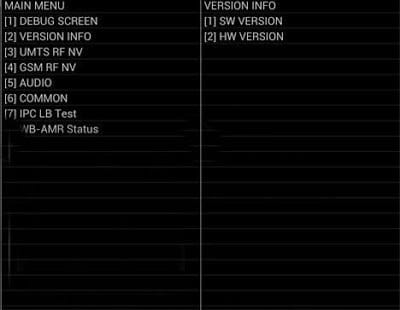
- Dial *#197328640#*or *#*#197328640#*#* in your dial pad
- It will open the Service Menu.
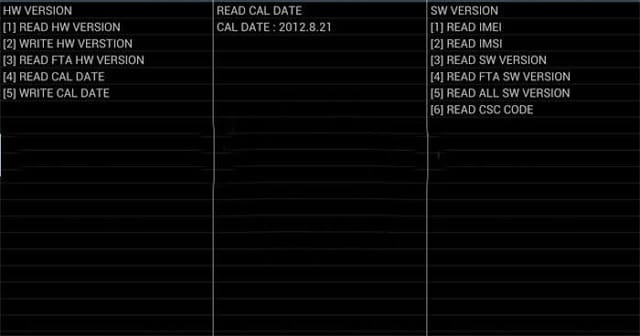
- Select the Menu Version Info >>> Hard Ware Version >>> Read Cal Date
- You will now see the actual date when your device was manufactured. Who knows, maybe you’ve been using an ancient device (winks)
What more?
You will find it difficult to memorize the code to view your device manufacturing date. Unlike the IMEI number which can be considered by dialing a simple shortcode *#06#.Hence, the most comfortable code to see your device manufacturing data alone is *#0000#.
As you may expect, when you dial *#0000#, you will only see the manufactured date. But, when you dial either *#197328640#*, or *#*#197328640#*#* you are presented with other useful information.
You Know any other codes Beyond this? Comment below to share with other users.

.jpg)
.jpg)


